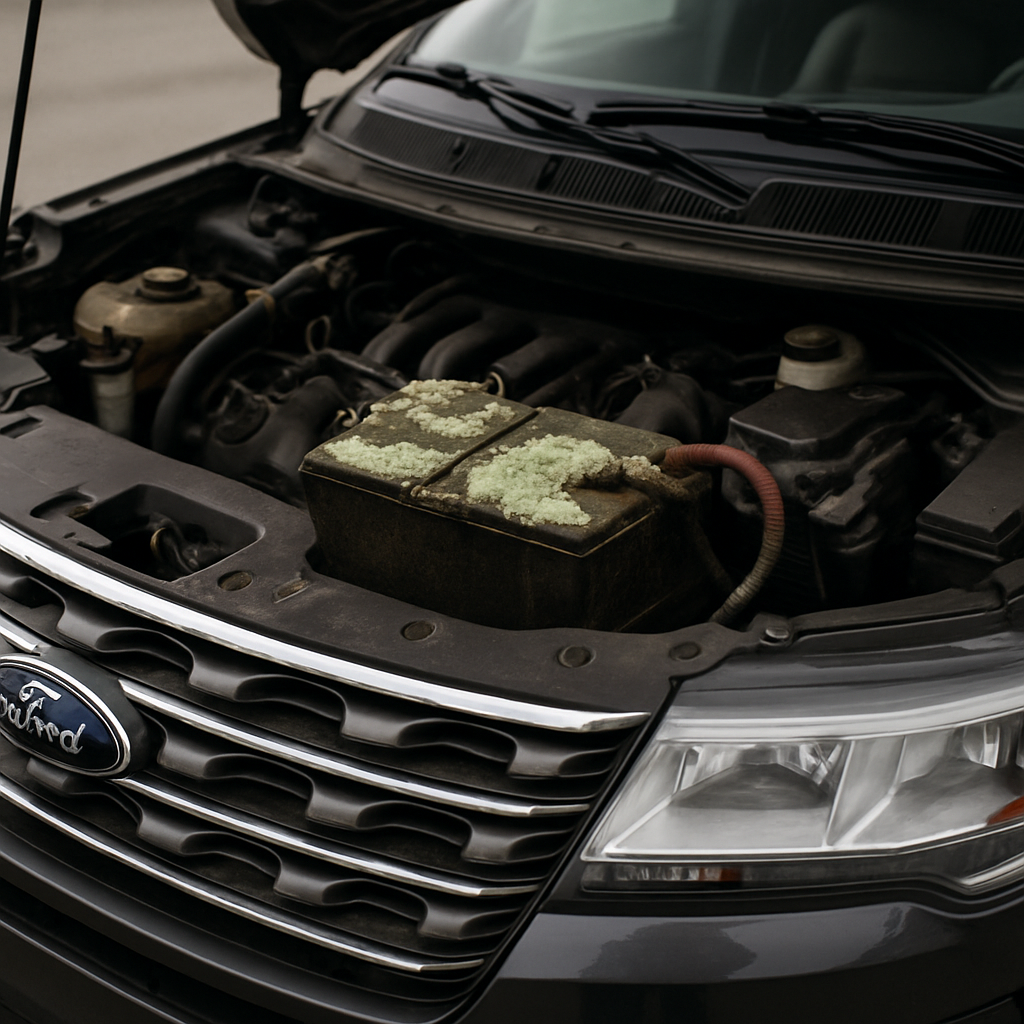
If you own a 2016 Ford Explorer, battery corrosion is a widespread maintenance issue. Battery corrosion can lead to hard-start problems, electrical glitches, and even unexpected vehicle shutdowns. Understanding what causes corrosion, how to spot symptoms early, and knowing whether it signals a bigger issue saves you time, money, and headaches down the road.
What Are the Typical Symptoms of Battery Corrosion in a 2016 Ford Explorer?
The most common indicators of battery corrosion in your Explorer include a white or bluish buildup on terminals, difficulty starting the engine, and flickering dash lights. Drivers might also notice poor radio, AC, or electronic system performance. Ignore these warning signs, and you risk getting stranded or damaging expensive electrical parts.
That chalky material on the terminals isn’t just unsightly—it disrupts the flow of electricity. As corrosion worsens, you may experience slow cranking or frequent jump-start needs. The corrosion can spread under terminal covers out of sight, so routine inspection is critical. According to firsthand accounts from Explorer owners, spotting even minor blue buildup under the terminal cover sometimes signals more serious underlying problems with your battery or charging system.
Besides visible signs, electrical issues like unexplained warning lights or infotainment reset cycles can appear. These subtle symptoms are easy to miss but often trace back to hidden corrosion buildup.
Is There a Recall for Battery Corrosion Issues on the 2016 Explorer?
Despite the frequency of corrosion complaints, Ford has not issued a dedicated recall specifically targeting battery corrosion in the 2016 Explorer. Recalls focus primarily on safety, so unless the corrosion poses a direct hazard, it is unlikely to prompt official manufacturer action. Still, some owners hope for coverage, given the number of reported cases.
The main recalls for the 2016 Explorer address suspension, door latches, and seat mechanisms. Battery or terminal maintenance falls under standard warranty coverage or your own out-of-pocket repairs. If you suspect your issue relates to a recall, check with your local Ford dealer or the NHTSA database. To learn how other drivers have handled similar corrosion cases, you can read about documented experiences shared by owners online.
Some battery models in these vehicles may be more prone to venting acid and causing corrosion, but there has not been an official recall linked directly to terminal corrosion for the 2016 model year. Always check for updates, as recall information can change over time.
Regular maintenance remains the best prevention, as waiting for a recall leaves you vulnerable to further damage and possible safety risks.
How Do Other Owners Describe Battery Corrosion Problems with the 2016 Explorer?
Browse owner forums and you will find 2016 Ford Explorer drivers voicing persistent frustration with battery corrosion. Many describe finding thick blue or white deposits beneath the plastic terminal covers during routine service visits. Concerns often include unexpected breakdowns and worries about corrosive acid damaging engine bay paint or wiring.
On sites like Reddit, stories include symptoms such as repeated need for jump-starts, premature battery replacements, and even corrosion affecting surrounding cables. One user documented how acid leaking from a vented battery led to severe terminal corrosion—and a hefty service bill.
Another recurring theme is disappointment that cleaning terminals provides only a temporary fix. For some, the problem returns within months if the root cause goes unaddressed. A few owners link corrosion with infrequent driving patterns or short trips that don’t fully recharge the battery.
Does Finding Corrosion Mean Your Battery Is Failing?
Corrosion on your battery doesn’t always mean the battery itself is bad, but it’s a clear signal to take action. The build-up can hinder electrical flow even if your battery retains a charge, leading to sluggish starts or sporadic electrical faults. Still, once corrosion appears, it often accelerates wear and eventual failure of both the battery and cables.
If you catch corrosion early and clean it off—making sure it doesn’t reappear—you might get more life from your battery. But chronic or heavy corrosion can indicate a battery that is venting acid due to overcharging, internal failure, or age. According to service advisors, inspections looking for underlying battery health or charging system errors are key for long-term reliability. Reliable dealers will check for corrosion and test battery health before pushing for a full replacement.
Don’t ignore corrosion. Repeated jump-starts or persistent buildup signal it may be time for a new battery or at least a thorough diagnostic check.
What Are the Most Common Battery-Related Issues With a Ford Explorer?
Beyond terminal corrosion, 2016 Explorer owners sometimes face quick battery drain, alternator overcharging, or bad grounds. All can stem from the vehicle’s heavy electrical load and stop-start habits. If your Explorer repeatedly needs jump-starting or loses power rapidly, don’t rule out an underlying battery defect, alternator issue, or just an old battery nearing the end of its life cycle.
Other typical battery issues include:
- Poor alternator health causing under- or over-charging.
- Short trips preventing full battery recharge.
- Battery age—anything over 3-4 years is suspect.
- Loose, dirty, or damaged terminals allowing corrosion to appear.
Proactive maintenance, like checking for corrosion monthly and ensuring connections stay tight and clean, helps prevent most of these setbacks. Keeping battery terminals free of buildup and watching for changes in starting performance offers the easiest path to avoiding unexpected electrical trouble.
Staying alert for symptoms and acting fast is your best defense against costly battery and electrical repairs on your Explorer.
A little early attention to battery health goes a long way toward preserving your Explorer’s smooth operation and reliability.
Pingback: What to Do for a Cylinder 2 Misfire in Your Mercedes: Symptoms, Fixes, and P0302 Code - Premier Motoring Blog
Pingback: Ford Explorer vs Toyota Highlander: Size, Reliability, Price, and Ownership - Premier Motoring Blog