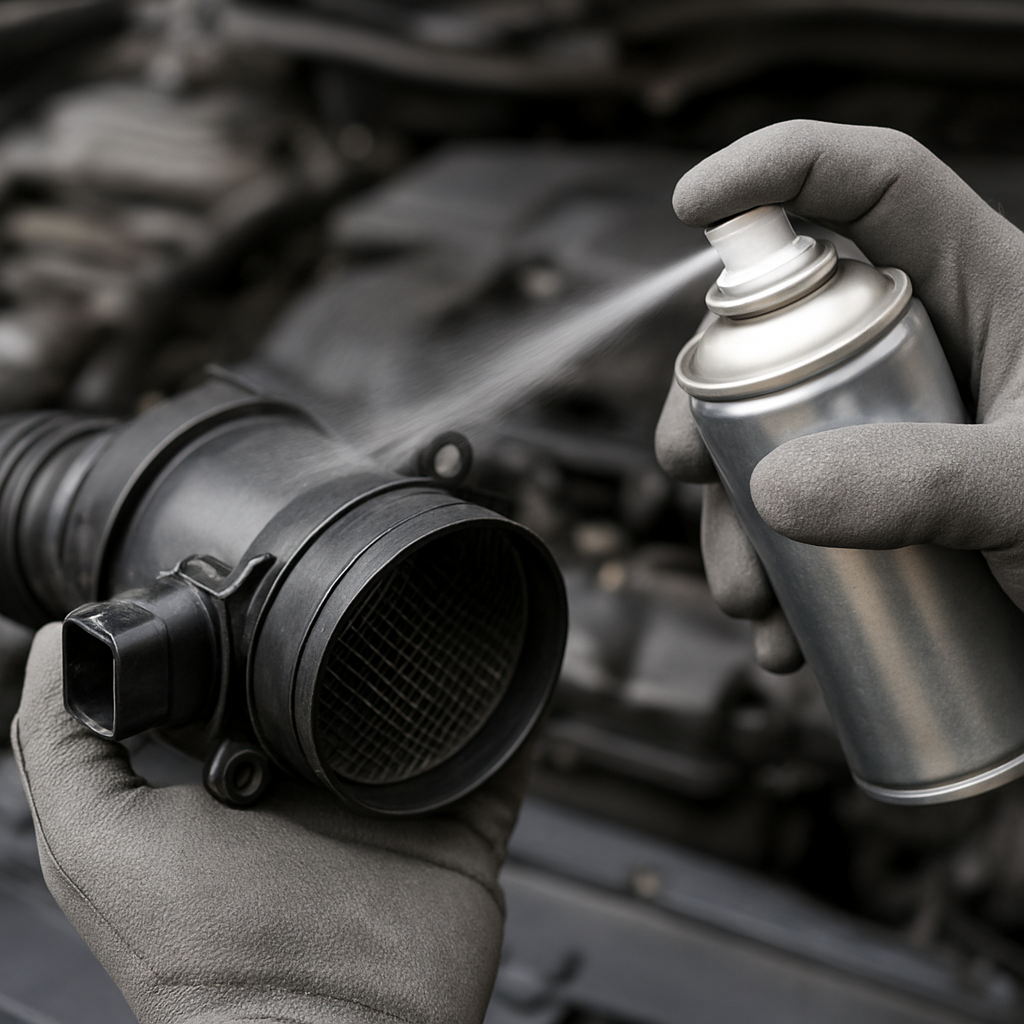
You can clean a mass air flow (MAF) sensor when contamination is suspected, but cleaning is not a guaranteed fix for poor running or a warning light. Use a cleaner made specifically for MAF sensors, avoid touching the sensing element, and let it air-dry completely. The sensor’s location and removal procedure vary by vehicle, so check the exact owner’s or service manual before starting.
How to clean a mass air flow sensor safely
The MAF sensor is commonly fitted in the intake tract near the air-filter housing, but its exact location and access differ between vehicles. Consult your manual to identify the sensor and confirm whether it can be removed and how to disconnect its electrical connector. Do not assume one procedure applies to every car.
- Switch the engine off. Identify the MAF sensor using the vehicle manual. Do not start work if you are unsure which component it is.
- Check the vehicle-specific removal instructions. If the manual permits removal, disconnect the sensor connector as directed and remove the sensor using the specified method. Follow any battery-isolation steps required by the vehicle instructions. Do not pull on wiring or force a connector or fastener.
- Handle the sensing element gently. Place the sensor over a clean surface or shop towel to catch cleaner runoff. Keep fingers, tools and cloths away from the sensing wires or film.
- Apply MAF-specific cleaner. Follow the cleaner maker’s instructions. As a product-specific example, CRC’s guide describes using about 10–15 sprays from roughly 4–6 inches away. Those figures apply to that product’s instructions, not as a universal specification. The CRC MAF-cleaning guide also warns against contacting the sensing element with the nozzle or any other object.
- Let it air-dry completely. Set the sensor on a clean surface in a safe place. Do not use compressed air, a hair dryer or a cloth to speed drying; these can damage the sensor or leave fibres behind, according to the CRC guide.
- Reinstall it carefully. Follow the vehicle’s instructions to refit the sensor and reconnect its electrical connector. Check that the parts are seated as specified before starting the engine.
- Recheck the original concern. See whether the symptoms or warning remain. If they do, seek further diagnosis rather than repeatedly cleaning the sensor or replacing it without confirming the fault.
Battery-disconnection requirements depend on the vehicle and the work being performed. Follow the exact owner’s or service manual rather than assuming the battery must—or must not—be disconnected. Cleaning may help when contamination is involved, but it cannot confirm that the MAF was the cause or that it is now working correctly.
What cleaner should you use—and can you use WD-40?
Use a product specifically formulated for mass air flow sensors and follow its label. Do not assume a household cleaner or a product intended for another component is suitable for the delicate sensing element.
Do not use WD-40 as a substitute for MAF cleaner. The cleaning instructions cited here specify purpose-made MAF cleaner, not WD-40. Follow the sensor and cleaner manufacturers’ instructions instead of experimenting with other products.
Can you clean a MAF sensor without removing it?
There is no universal spray-in-place method established by the cleaning instructions cited here. Access and removal depend on the vehicle design, and detailed cleaning instructions address an accessible sensing element. Spraying indiscriminately into the intake may not follow the correct procedure for your vehicle.
Check the owner’s or service manual to see whether the sensor must be removed and how to access it. If the manual does not permit the method you are considering, or removal is not practical, do not improvise: ask a qualified technician. If the sensor is removed according to the vehicle procedure, use MAF-specific cleaner, do not touch the sensing element and allow it to air-dry completely.
Signs of a dirty MAF sensor—and why they are not a diagnosis
Rough idle, hesitation and reduced fuel economy may occur in connection with a dirty MAF sensor. A P0101 code may also appear in a MAF-related diagnostic context. These are clues, not proof that the sensor is dirty or defective: symptoms and codes can have more than one possible cause.
If cleaning does not resolve the concern, or a code returns, have the issue diagnosed rather than assuming the MAF needs another cleaning or automatic replacement. A P0101 code alone does not confirm that the sensor is contaminated.
If drivability symptoms persist, arrange appropriate diagnosis rather than relying on cleaning as a confirmed repair.
Cleaning a MAF sensor on a Nissan
The general cleaning principles are to use MAF-specific cleaner, handle the sensing element gently, avoid touching it and let it air-dry completely. Sensor locations, fasteners, connector handling and removal or installation procedures can vary by Nissan model and year. Check the exact owner’s or service manual before working on the sensor; do not assume the same procedure applies to every Nissan.
Does a Nissan MAF sensor need to be reset after cleaning?
Whether a reset or relearn is required depends on the exact vehicle and its service instructions. Do not use battery disconnection as a workaround or assume a scan-tool procedure is needed. Check the service information for the model and year, or ask a qualified technician.
Cleaning a MAF sensor on a Chevy
For a Chevrolet, follow the general method only if the vehicle’s instructions permit it: use MAF-specific cleaner, avoid contact with the sensing element and allow it to air-dry completely before careful reinstallation. Model and year determine access, connector handling and removal details, so consult the exact owner’s or service manual.
A check-engine light or an air-fuel-related code does not, by itself, prove that the MAF is dirty. If a warning or running symptom remains after cleaning, arrange further diagnosis instead of treating the sensor as a confirmed cause.
Cleaning a MAF sensor on a Chevy Silverado 1500
The exact procedure for a Silverado 1500 depends on its model year. Check the manual for your specific vehicle before removal or cleaning; do not assume one set of instructions fits all years.
If symptoms or a code persist after a permitted cleaning, have the cause checked. A code or running problem is not confirmation that the MAF is contaminated.
Cleaning a MAF sensor on a Toyota Corolla
Use MAF-specific cleaner, do not touch the sensing element and let it air-dry completely. Location, connector, fastener and removal instructions can differ by Corolla model year. Consult the exact Toyota owner’s or service manual before attempting the job.
Cleaning the MAF sensor and throttle body: keep the procedures separate
The MAF sensor and throttle body are separate components. The cleaning steps here cover the MAF sensor; they are not a complete throttle-body cleaning procedure. Use only MAF-specific cleaner on the MAF, and do not assume that a cleaner intended for the throttle body is suitable for its delicate sensing element.
For throttle-body work, follow the vehicle and product instructions for that separate task. Do not let a combined cleaning job lead to spraying an unapproved product onto the MAF. If you cannot identify the parts or confirm the correct procedure, have a qualified technician carry out the work.